
Change your "Details" on myspace
MalwareBytes is GeekDrop's Favorite Anti-Malware Solution
Act now to get a huge savings on GeekDrop's favorite Backup, Imaging, & Drive Utilities. Also our member's #1 choice!




Just below your "heroes" section is your Details section where you answer the basic myspace questions: Status, orientation...blah blah blah. How boring well now you can change them....
At the very top of your "about me" place this code:
</div>
<style>.hide {visibility:hidden; display:none;}</style>
Then at the bottom of your "Heroes" section place this code:
</td></tr></table>
</td></tr></table>
<br />
<table bgcolor="6699cc" border="1" bordercolor="6699cc" cellpadding="0" cellspacing="0" width="300">
<tr>
<td class="text" align="left" bgcolor="6699cc" height="10" valign="center" width="300"> <span class="whitetext12">More Than You Need To Know</span>
</td>
</tr>
<tr>
<td valign="top">
<table align="center" bgcolor="ffffff" border="0" bordercolor="000000" cellpadding="3" cellspacing="3" width="300">
<tr>
<td align="left" bgcolor="b1d0f0" valign="top" width="100"><span class="lightbluetext8">Status:</span></td>
<td bgcolor="d5e8fb" width="175">Geek Mom!
</td>
</tr>
</tr>
<tr>
<td align="left" bgcolor="b1d0f0" valign="top" width="100"><span class="lightbluetext8">Hometown:</span></td>
<td bgcolor="d5e8fb" width="175">L.A., Calif.</td>
</tr>
<tr>
<td align="left" bgcolor="b1d0f0" valign="top" width="100"><span class="lightbluetext8">Current Location:</span></td>
<td bgcolor="d5e8fb" width="175">Sunny South Florida
</td>
</tr>
<tr>
<td align="left" bgcolor="b1d0f0" valign="top" width="100"><span class="lightbluetext8">Children:</span></td>
<td bgcolor="d5e8fb" width="175">3 boys
</td>
</tr>
<tr>
<td align="left" bgcolor="b1d0f0" valign="top" width="100"><span class="lightbluetext8">Sign:</span></td>
<td bgcolor="d5e8fb" width="175">Taurus
</td>
</tr>
<tr>
<td align="left" bgcolor="b1d0f0" valign="top" width="100"><span class="lightbluetext8">Favorite time of the year:</span></td>
<td bgcolor="d5e8fb" width="175">Fall
</td>
</tr>
<tr>
<td align="left" bgcolor="b1d0f0" valign="top" width="100"><span class="lightbluetext8">Hobbies:</span></td>
<td style="" bgcolor="d5e8fb" width="175">arts / crafts & computers
</td>
</tr>
<tr>
<td align="left" bgcolor="b1d0f0" valign="top" width="100"><span class="lightbluetext8">Education:</span></td>
<td bgcolor="d5e8fb" width="175">Graphic Art & Photography Degree
</td>
</tr>
<tr>
<td align="left" bgcolor="b1d0f0" valign="top" width="100"><span class="lightbluetext8">Biggest Accomplishment:</span></td>
<td bgcolor="d5e8fb" width="175">My Children
</td>
</tr>
</td>
</tr>
</table>
</td>
</tr>
</table>
</td>
<td>
</td>
<td>
<div class="hide"><table><tr><td><table><tr><td>
NOTE: The text that is in red you need to replace with your OWN information. Change the questions up and make it personal. The information here is from MY myspace :-)
now on mine I did add in one more line and I hyperlinked it. So if you want to add a line with a hyperlink you can - this what you need to add into the code:
<td align="left" bgcolor="b1d0f0" valign="top" width="100"><span class="lightbluetext8">My
Beach:</span></td>
<td bgcolor="d5e8fb" width="175"><a href="http://www.evsjupiter.com/main.htm">Debbie's
Beach (web cam)</a>
Here is how it looks on my profile:
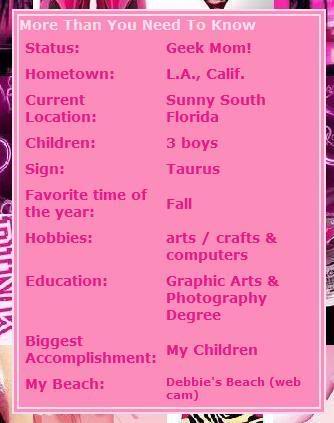
Credit to this goes to P to the izzle on grownupgeek

- 2303 reads

~The only stupid question is the one that remains unasked~
~Niebr~
I had one deleted for trackers (the old cookie stealing trackers). Who knows and you wont ever get a answer from myspace. Its also possible if you have enought ppl report your profile that it will be deleted.
Who's New




Pittsburgh, Pennsylvania
~The only stupid question is the one that remains unasked~
~Niebr~