
Jailbreak iPhone iPod Touch
MalwareBytes is GeekDrop's Favorite Anti-Malware Solution
Act now to get a huge savings on GeekDrop's favorite Backup, Imaging, & Drive Utilities. Also our member's #1 choice!


NOTE: Only do this if you already updated to OS 3.1.2 - also read precation on bottom before starting !
Follow the steps below to jailbreak all iPhone’s and iPod touches on OS 3.1.2:
Step 1: Download and install the latest version of iTunes (download link given below).
Step 2: You will now need to first update/restore to the original iPhone OS firmware 3.1.2 on your iPhone by using the latest version of iTunes. Download link for iPhone Firmware 3.1.2 is given at the end of the post.
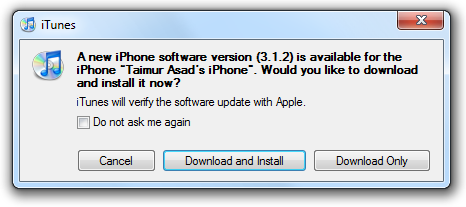
Step 3: Download blackra1n for Windows (download link at the end of the post).
Step 4: Start blackra1n app. If you are on Windows 7
Step 5: Click on “make it ra1n”:
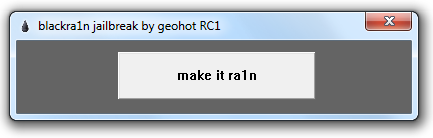
Step 6: Let the app do its thing and wait for the phone to automatically reboot.
Step 7: You should now have “blackra1n” in the list of applications on your iPhone. Run “blackra1n”, download Cydia and let it install it.
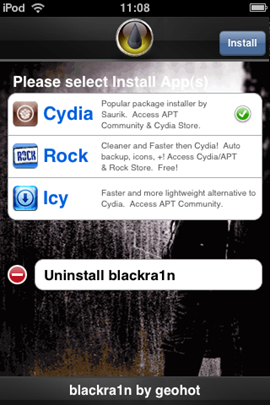
*** 3rd Gen iPod Touch has to be booted while hooked up to PC with Blackra1n on it if you Power it down completely !
**This doesn't Unlock Your iPhone to work with other NON AT&T carriers , but you have to jailbreak before you Unlock !
* Unlock will be cover in another Thread so search for "iPhone Unlock" here on Geekdrop.com
Download iTunes
Download iPhone 3.1.2 Firmware
Download blackra1n for Windows
*
Read More ...
- How to Easily Wi-Fi Transfer from Phone or Tablet to a Desktop Computer?
- Were you actually enough of a dumdum to drill a headphone port into your iPhone? ;)
- Where to Download iPhone Paid Apps?
- Which New Phone Are You Going To Get?
- Apple iTunes AppStore Keeps Asking for / Won't Remember My Password!
- I-phone App
- iPhone 5 Leaked Image
- Apple iTunes App Store keeps forgetting my password!
- bricked iphone
- Official GeekDrop Android & iPhone / iPod Touch Wallpaper

- 1762 reads

Who's New




Recent comments
1 day 14 hours ago
1 day 14 hours ago
1 week 5 days ago
1 week 6 days ago
5 weeks 9 hours ago
1 year 15 weeks ago
1 year 36 weeks ago
1 year 37 weeks ago
1 year 42 weeks ago
1 year 42 weeks ago