
How To Add Administrative Tools To Your Computer
MalwareBytes is GeekDrop's Favorite Anti-Malware Solution
Act now to get a huge savings on GeekDrop's favorite Backup, Imaging, & Drive Utilities. Also our member's #1 choice!

Sun, 03/07/2010 - 11:53am (16 years 31 weeks ago)



Its pretty easy to add Administrative tools to your computer and it then gives you more advance options to manage/configure your computer
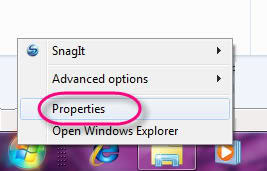
Right click on your start button then choose "properties"
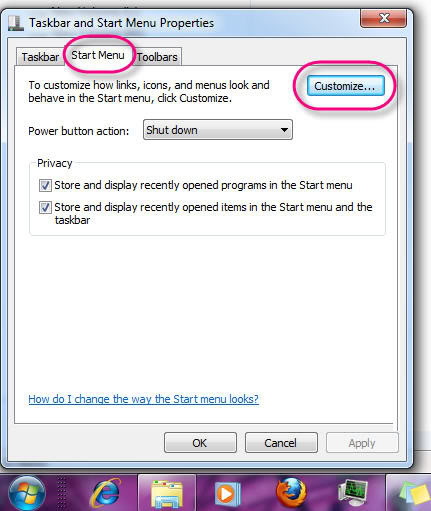
Then click on "customize" its in the start menu tab if you don't see it.
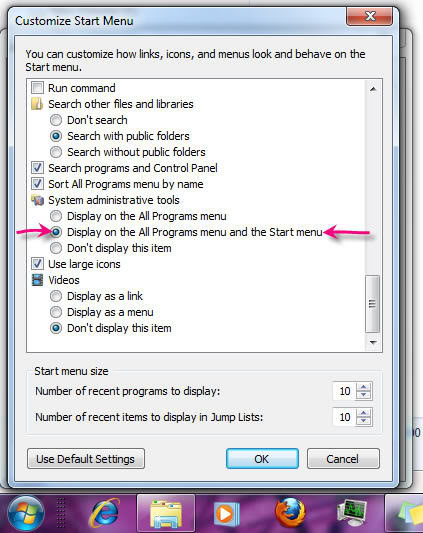
Once your there you need to scroll down (its towards the bottom) to "Systems administrative tools" and click the button that says "Display on the All Programs menu and the Start Menu"
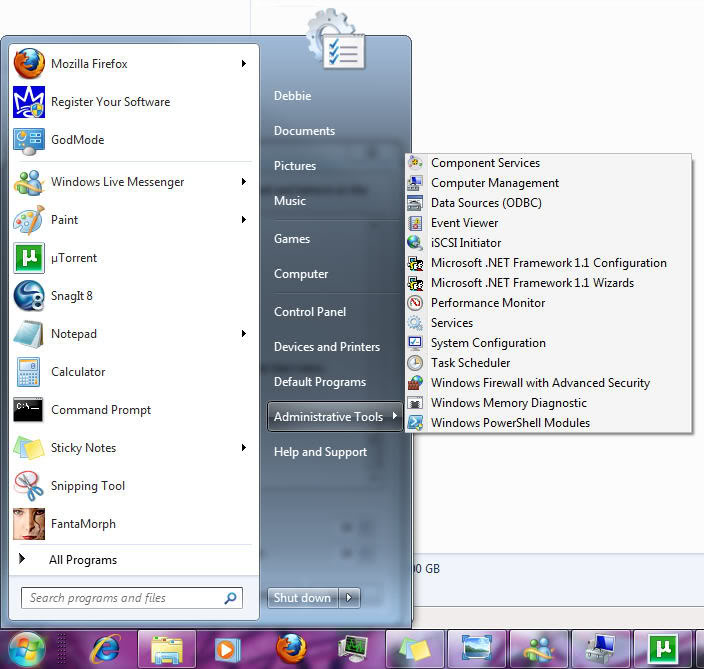
Once you do that you will now see it on your start menu 

- 1841 reads

Who's New



Single & Not Looking
Just did it, very cool, thanks !