
How To Update Google Chrome
MalwareBytes is GeekDrop's Favorite Anti-Malware Solution
Act now to get a huge savings on GeekDrop's favorite Backup, Imaging, & Drive Utilities. Also our member's #1 choice!

Fri, 03/29/2013 - 4:19pm (13 years 26 weeks ago)




How to Manually Update your Google Chrome Web Browser
Google Chrome usually updates itself by putting an Update program in your start-up, but sometimes you may need to (or just want to) update it yourself, or just check check for an update, so here's how to do it.
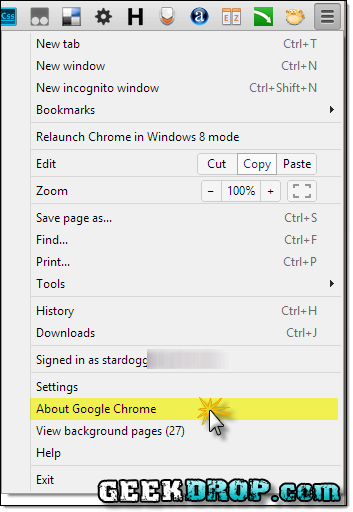
Step 1: Click on "About Google Chrome"

Step 2: Not technically a "step", it'll automatically start updating if a new update is available. If no update is available, you'll see the same message as in Step 4 below.

Step 3: If an update was performed, all you need to do once it's done is click that "Relaunch" button, which will restart Chrome.

Step 4: After Chrome restarts, you can go back to the About screen and it'll tell you "Google Chrome is up to date".
All Done!
Read More ...
- No Sound in Google Chrome?
- Organizr Viewer: Chrome Browser Extension to Easily Quick-View your Organizr Server
- I Can't Highlight / Select Text in the Google Chrome Location Bar!
- Notice of Class Action Settlement re Google Plus (G+) - Your Rights May Be Affected
- How to Block Assholes, I Mean, Buyers / Bidders on Ebay
- What is: http://www.msftconnecttest.com/redirect ? [SOLVED]
- How to Add AHK (AutoHotkey) Scripts to Windows Start Up
- https://www.msn.com/?ocid=wispr&pc= Pop-Up When Logging Into Windows? [SOLVED]
- How Do I Edit My Windows 'Send To' Folder So I Can Put My Own Apps in it? - Solved
- How excited are you about Virtual Reality? (Oculus Rift, Google CardBoard, etc.)?

- 3606 reads

Who's New



Recent comments
1 week 2 days ago
1 week 3 days ago
4 weeks 5 days ago
1 year 15 weeks ago
1 year 36 weeks ago
1 year 37 weeks ago
1 year 41 weeks ago
1 year 41 weeks ago
1 year 50 weeks ago
2 years 17 weeks ago