
How To Select Text Vertically in MS Word
MalwareBytes is GeekDrop's Favorite Anti-Malware Solution
Act now to get a huge savings on GeekDrop's favorite Backup, Imaging, & Drive Utilities. Also our member's #1 choice!

Wed, 10/06/2010 - 8:02am (16 years 20 hours ago)


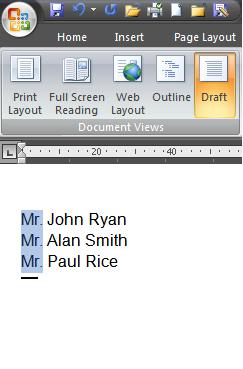
Most everybody knows how to select text horizontally in MS Word, but sometimes you may need to select text vertically. For example, you might need to delete the first few words in every line in a list or, bold or italicize it. So here's how to select text vertically in Word 2007.
Just hold down the "Alt" key and select the text, now you can bold, delete, italicize, change font, or whatever it is you need to do.
Easy peasy 
Read More ...
- How to Temporarily Hide Those Annoying Red and Green Squiggly Lines in MSWord (Microsoft Word)?
- Synonyms In MS Word
- How Do I insert a watermark in Word 2007
- How To Change Ruler Units In MS Word 2007
- Folders / Files Are Showing In Reverse Alpha Order
- Recover A Corrupt Word File
- How To Clear Recently Used Files In MS Office 2007

- 2467 reads

Who's New




Recent comments
20 hours 51 min ago
20 hours 53 min ago
1 day 7 hours ago
5 days 13 hours ago
5 days 14 hours ago
2 weeks 2 days ago
2 weeks 3 days ago
5 weeks 4 days ago
1 year 16 weeks ago
1 year 37 weeks ago