
How To Clear Recently Used Files In MS Office 2007
MalwareBytes is GeekDrop's Favorite Anti-Malware Solution
Act now to get a huge savings on GeekDrop's favorite Backup, Imaging, & Drive Utilities. Also our member's #1 choice!

Fri, 04/09/2010 - 12:40pm (16 years 25 weeks ago)


Here's how to clear the list of recently used files in MS Office 2007 (Word, Excel, Powerpoint).
Go to the Office Button, choose the Word/Excel/Powerpoint options button in the lower right hand corner.

In that dialog box go to "Advanced". Scroll down to "Display" and where it says "Show this number of recent documents" set the number to 0 then hit OK.
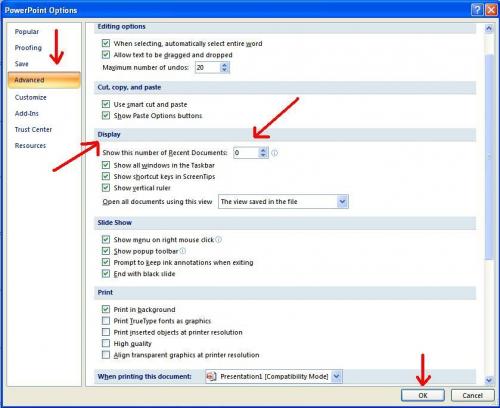
Your list will be clear.

Read More ...
- Folders / Files Are Showing In Reverse Alpha Order
- How to Temporarily Hide Those Annoying Red and Green Squiggly Lines in MSWord (Microsoft Word)?
- How To Select Text Vertically in MS Word
- How To Remove Values but Keep Formulas in MS Excel 2007
- Synonyms In MS Word
- How Do I insert a watermark in Word 2007
- Counting Rows and Columns in MS Excel
- How To Add A Calculator To The Excel Quick Access Toolbar
- Center Text Across Selected Cells Without Merging Cells in MS Excel
- How To Change Ruler Units In MS Word 2007

- 3564 reads

Who's New




Recent comments
23 hours 58 min ago
1 day 1 min ago
1 day 10 hours ago
5 days 17 hours ago
5 days 17 hours ago
2 weeks 2 days ago
2 weeks 3 days ago
5 weeks 4 days ago
1 year 16 weeks ago
1 year 37 weeks ago