
How To Add A Calculator To The Excel Quick Access Toolbar
MalwareBytes is GeekDrop's Favorite Anti-Malware Solution
Act now to get a huge savings on GeekDrop's favorite Backup, Imaging, & Drive Utilities. Also our member's #1 choice!

Tue, 05/11/2010 - 10:01am (16 years 21 weeks ago)


While working in Excel, often times there's a need to use a calculator, here's a way to add one to your toolbar in Excel 2007.
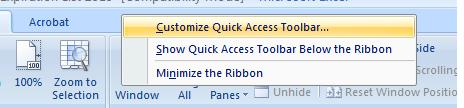
First, right click on the toolbar and choose "Customize Quick Access Toolbar".
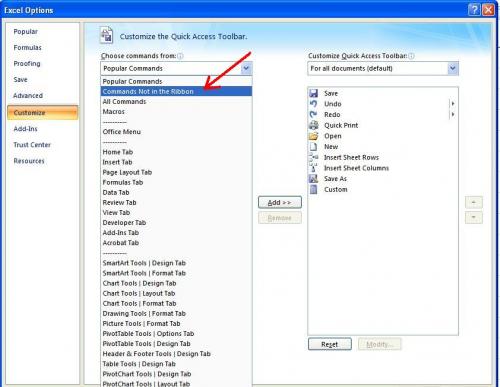
On the next Excel Options screen choose "Commands Not in the Ribbon" from the "Choose Commands From" drop down menu.
Scroll down to "Calculator" then click on "Add" and the calculator will show up on the right, click "OK".
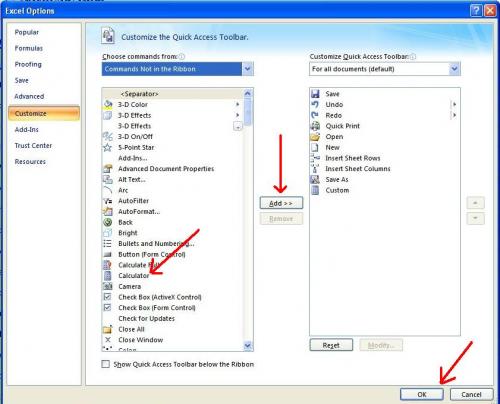
It will now be added to your quick access toolbar. Just click it to open it. 

Read More ...
- How To Remove Values but Keep Formulas in MS Excel 2007
- Counting Rows and Columns in MS Excel
- Center Text Across Selected Cells Without Merging Cells in MS Excel
- Folders / Files Are Showing In Reverse Alpha Order
- Align Decimals In Numbers With Variable Decimal Places In MS Excel
- How To Clear Recently Used Files In MS Office 2007
- F2 Editing Button Not Working - Excel

- 3828 reads

Who's New




Wellington Florida
Married
Nice:) I didn't even know that was a option.