
Synonyms In MS Word
MalwareBytes is GeekDrop's Favorite Anti-Malware Solution
Act now to get a huge savings on GeekDrop's favorite Backup, Imaging, & Drive Utilities. Also our member's #1 choice!

Tue, 08/17/2010 - 2:37pm (16 years 7 weeks ago)


If you're typing a letter in Word or let's say even a resume but you don't want to use the same word over and over, you can easily choose a synonym by doing the following, in this case the word I want to change for a similar meaning is "cell".
Right click on the word you want to replace with a synonym, and the following menus will pop up.
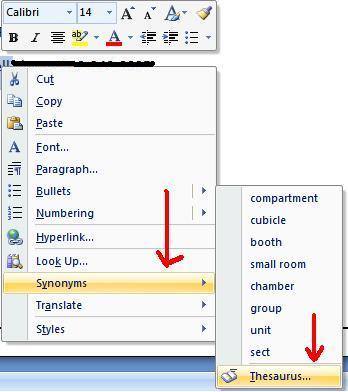
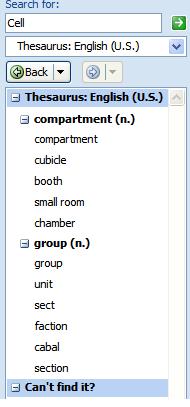
Right click on the word you want to replace with a synonym, and the following menus will pop up.
To the right of your screen you will see the different options for the word you choose.
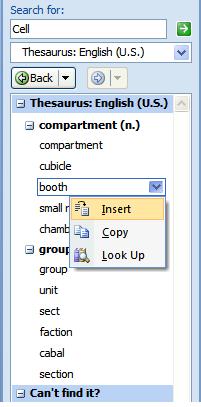
Now hover over the word you want to use and you will see the following drop down menu, just hit "Insert" and you're all done ! :grin:
NOTE: This also works in MS Powerpoint.
Read More ...
- How to Temporarily Hide Those Annoying Red and Green Squiggly Lines in MSWord (Microsoft Word)?
- How Do I insert a watermark in Word 2007
- How To Change Ruler Units In MS Word 2007
- SOLVED: Stop Microsoft OneNote from Constantly Asking to Sign-In to Sync your Notebook
- My Microsoft Office (Word, OneNote, Excel, etc.) and SnagIt Icons are Now Blank?
- Help! How do I keep my font choices in Microsoft Works Word Processor?
- How To Select Text Vertically in MS Word
- Counting Rows and Columns in MS Excel
- Center Text Across Selected Cells Without Merging Cells in MS Excel
- Check Only My Spelling in MS Outlook 2007

- 10528 reads

 unforunately not, I tried it. I guess because Excel mainly deals with numbers.
Who's New




Wellington Florida
Married
Wow that is a cool tip I had no idea about so thanks for the info. What about excel does it work in there? Thanks missb