
Recall A Sent Message In MS Outlook 2007
MalwareBytes is GeekDrop's Favorite Anti-Malware Solution
Act now to get a huge savings on GeekDrop's favorite Backup, Imaging, & Drive Utilities. Also our member's #1 choice!

Fri, 04/09/2010 - 2:12pm (16 years 27 weeks ago)


Ever sent a message in MS Outlook 2007 and realize that you just made a big mistake? Well here's a way to recall it IF the recipient hasn't already opened it.
Go to your sent messages and double click on the message you want to recall to open it up. Click on "Other Actions" on the ribbon up top and choose "Recall this message".

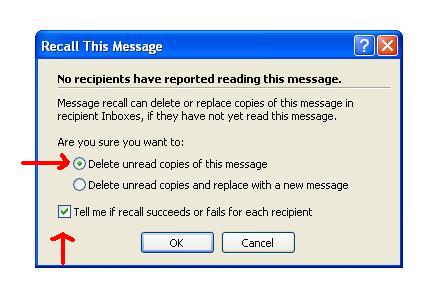
This dialog box will pop up, make sure you choose "Delete unread copies of this message" and also check off the "Tell me if recall succeeds or fails for each receipient".
Within a few seconds (at least that's all it took for me) you will get a notification on whether you were successful or not in retrieving the email without it being read.
 <----- SUCCESSFUL
 <------- OOPS! UNSUCCESSFUL
If you work really fast on this the chances are good that you will be successful!!
Read More ...

- 4219 reads

Who's New



Wellington Florida
Married
oh I'm so testing this one on Monday (I use MS Outlook at work).