
Transpose Data From A Row To A Column Or Vice-Versa In MS Excel
MalwareBytes is GeekDrop's Favorite Anti-Malware Solution
Act now to get a huge savings on GeekDrop's favorite Backup, Imaging, & Drive Utilities. Also our member's #1 choice!

Fri, 04/16/2010 - 11:39am (16 years 26 weeks ago)


Here's a little tip that will eliminate the need to retype data. For example, say you enter data into a spreadsheet with 4 column headings across a row and 4 row headings down a column as follows:
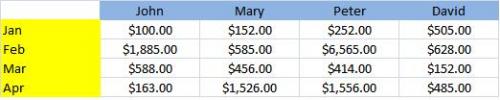
Let's say for whatever reason you need to have the current set of row labels (months) running across the columns and the column labels running down the rows, here's what to do.
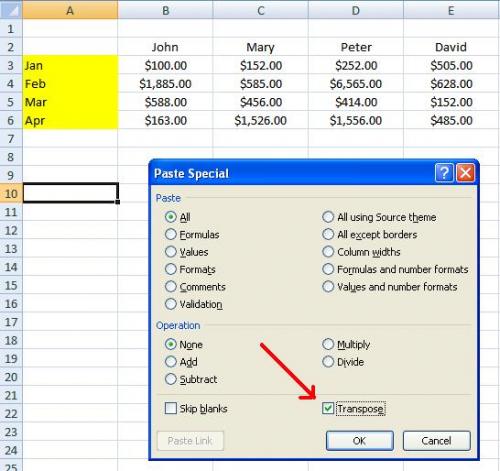
First off, select and copy the data range and click on the location in the sheet that you want it to be, right click on your mouse and choose "Paste Special"

On the "Paste Special" menu check off the "Transpose" box and click OK
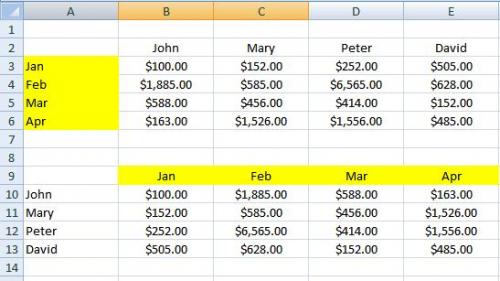
Your data will now be transposed 
.

- 1459 reads

Who's New



Recent comments
1 week 2 days ago
1 week 2 days ago
1 week 3 days ago
2 weeks 15 hours ago
2 weeks 15 hours ago
3 weeks 4 days ago
3 weeks 5 days ago
6 weeks 6 days ago
1 year 17 weeks ago
1 year 38 weeks ago