
Hide The Pop Out Screen Tips In MS Office
MalwareBytes is GeekDrop's Favorite Anti-Malware Solution
Act now to get a huge savings on GeekDrop's favorite Backup, Imaging, & Drive Utilities. Also our member's #1 choice!

Fri, 04/16/2010 - 12:28pm (16 years 24 weeks ago)


You will notice that when you hover your mouse over a command a "screen tip" pops out to tell you what that particular command does. Ok, that's great if you're a beginner but some of you are more experienced than that and these pop out screen tips can become annoying after a while, here's how to get rid of them:
For example, if you hover over the "Wrap Text" the following tip will pop out.

Click on the office button and choose "Word Options" from the bottom right.
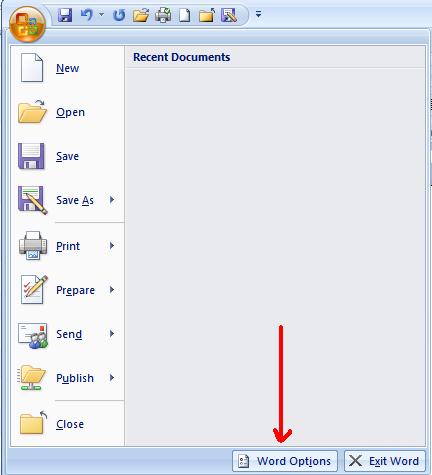
Choose "Popular" and you will see half way down "Screen Tip Style", hit the drop down button and choose "Don't Show ScreenTips", hit OK and you're done. You will not get anymore pop out screen tips.

Read More ...
- SOLVED: Stop Microsoft OneNote from Constantly Asking to Sign-In to Sync your Notebook
- My Microsoft Office (Word, OneNote, Excel, etc.) and SnagIt Icons are Now Blank?
- How to Temporarily Hide Those Annoying Red and Green Squiggly Lines in MSWord (Microsoft Word)?
- Help! How do I keep my font choices in Microsoft Works Word Processor?
- Synonyms In MS Word
- How Do I insert a watermark in Word 2007
- Counting Rows and Columns in MS Excel
- Center Text Across Selected Cells Without Merging Cells in MS Excel
- How To Change Ruler Units In MS Word 2007
- Check Only My Spelling in MS Outlook 2007

- 5068 reads

Who's New




Recent comments
4 days 18 min ago
4 days 41 min ago
2 weeks 12 hours ago
2 weeks 1 day ago
5 weeks 2 days ago
1 year 15 weeks ago
1 year 37 weeks ago
1 year 37 weeks ago
1 year 42 weeks ago
1 year 42 weeks ago