
Take Ownership Of A File
MalwareBytes is GeekDrop's Favorite Anti-Malware Solution
Act now to get a huge savings on GeekDrop's favorite Backup, Imaging, & Drive Utilities. Also our member's #1 choice!

Tue, 04/20/2010 - 4:46pm (16 years 23 weeks ago)


This is the standard way to take ownership of a file or folder
To take ownership and grant full control (or read write) permissions of files or folders in Windows Vista and Windows 7
- In Windows Explorer window, locate the files or folders that you want to take ownership and grant or change full control or other access permissions.
- Right click on the file or directory, and then select Properties on the right click menu.

- Click on Security tab.
- Click on Advanced button at the bottom.
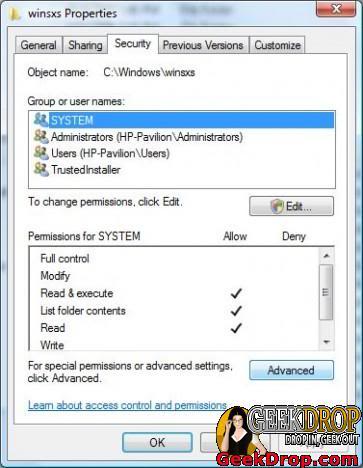
- In “Advanced Security Settings” dialog window, click on Owner tab.
- Here you will be able to see current owner (i.e. TrustedInstaller). To take ownership of the object, click on the Edit button. If UAC prompts for administrator’s password or permission to continue, enter the correct password or press Continue button.

- Additional “Advanced Security Settings” dialog will appear. Highlight the user name (for example, Administrators) in the Change owner to box that you want to assign as the owner for the object. Click OK to make the change.
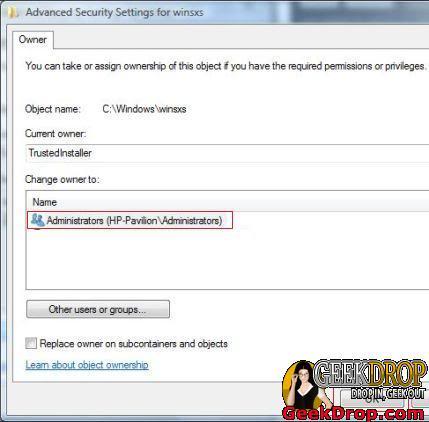
- Back in original parent level “Advanced Security Settings” window, you will see the existing owner of the file or folder has changed to the user you just selected.
- Click OK button to exit this window.
- Click OK again to exit completely from the Properties window.
- The ownership is now belonged to user or user account that been selected. To assign necessary permissions to the user too, repeat step 1 to 3 to open the object’s Properties window again.
- In object’s Properties window, click on Edit button to change permissions. If UAC prompts for administrator’s password or permission to continue, enter the correct password or press Continue button.
- Highlight the Administrators or the user who wants the permissions on the object be changed in the “Group or user names” box.
If the user ID or group that you want to manage the permissions for the object doesn’t exist, click on Add button, and type in the user name or group name desired into the Enter object names to select box, and finish off by clicking on OK.
- In the Permissions for Administrators box below (or any other user name or group name you chose), click on “Full Control” under the “Allow” column to assign full access rights control permissions to Administrators group.

Click “OK” twice when done.
Users can now do whatever you like to the files or directories processed as above.
Extra stuff:
Read More ...
- Top 5 Reasons to take ownership of a file !
- Create "Take Ownership" in Windows Right-Click Menu
- What Version of NDIS is My Computer Using?
- Auto login after PC is locked?
- How to remove programs from "Open With" list in Windows?
- Automatically Logon To Windows 7, Vista & XP
- How To Install Windows - A Tutorial For Beginners and Newbies - With Screenshots
- Customize Your 'Open' and 'Save As' Dialog Boxes
- Computer Wallpapers
- Can I Delete the "MATS" Folder? - SOLVED

- 11778 reads

Who's New




Recent comments
1 day 6 hours ago
1 day 6 hours ago
1 week 4 days ago
1 week 5 days ago
5 weeks 1 hour ago
1 year 15 weeks ago
1 year 36 weeks ago
1 year 37 weeks ago
1 year 42 weeks ago
1 year 42 weeks ago